Flat Rate is the simplest shipping method. It charges customers one fixed shipping cost, no matter the cart weight, total, or product quantity.
How to Add Flat Rate Shipping
From the Shipping Methods page, click “Add Shipping Method”, assign a method name, and select the relevant zone. Then configure the method:
- Choose Manual Rate, then select Flat Rate Method
- Enable Expected Delivery Time if you want to show delivery estimates to customers
(Optional) - Create your shipping rules by adding conditions
- Enable Advanced Display Rules if you need more control over when this shipping method appears
How Flat Rate Shipping Works
- Set the Shipping Cost
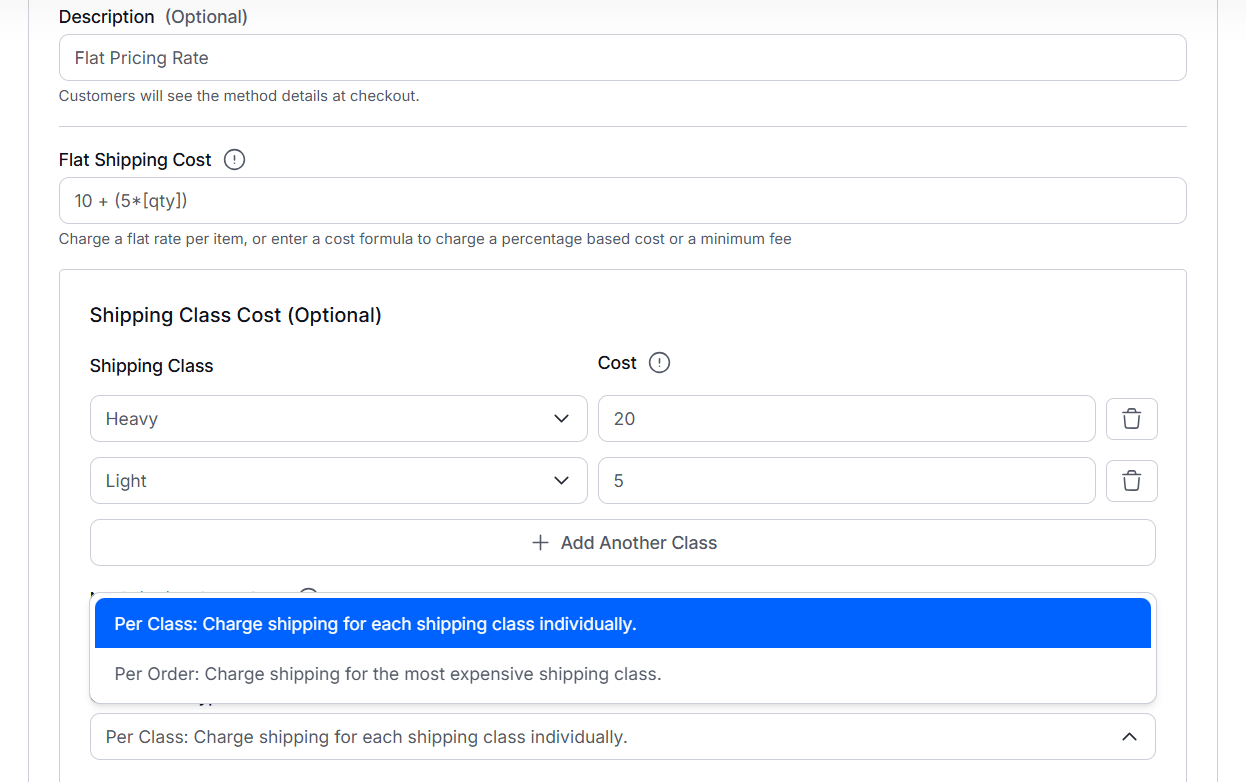
Enter a fixed amount that will be charged for shipping. - (Optional) Enable Shipping Class Cost
Turn this on if you want to charge different shipping costs for different product shipping classes. - Add Shipping Class Costs
- Select a Shipping Class (for example: Heavy, Fragile, Oversized).
- Enter the shipping cost for that class.
- Use the ➕ icon to add more classes if needed.
- No Shipping Class Cost
Set the shipping cost for products that do not have any shipping class assigned. - Choose Calculation Type
Decide how shipping class costs should be calculated:- Per Class – Charges shipping for each shipping class individually.
Update to the Flat Rate Shipping Method:
Some new updates have been introduced to the Flat Rate Shipping method with v1.0.1:
- Support for WooCommerce pricing formula – Support for WooCommerce pricing formula has been added. You can check out the official doc for more information.
- Classic Cart Support – Delivery date and shipping method description support added for the WooCommerce classic cart.
Here’s a sneak peek of the updated system: