
Use Case Summary
A store owner wants to set up straightforward weight-based shipping rates in WooCommerce.
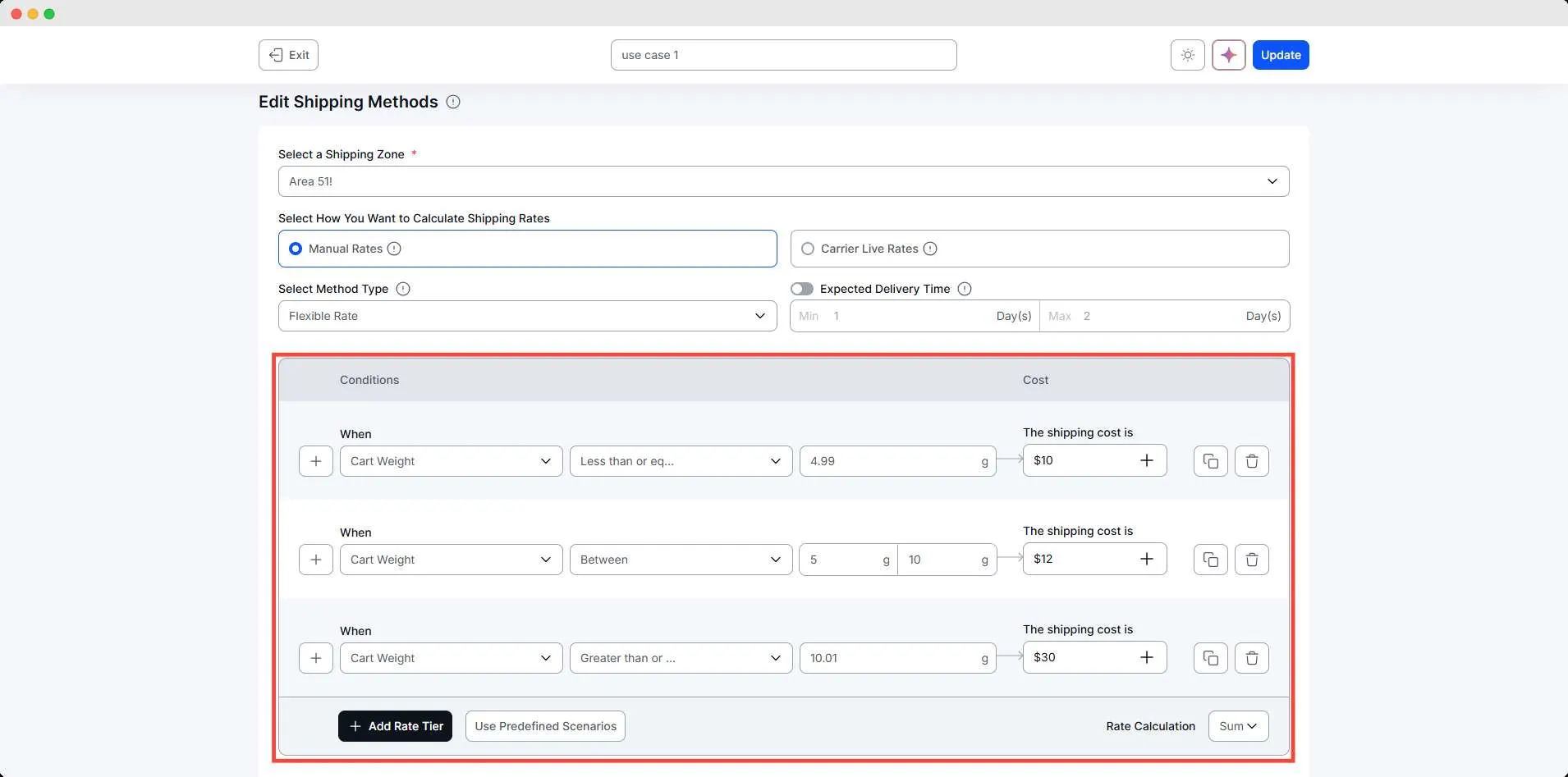
Their business charges customers according to the total cart weight using three clear pricing tiers. Lightweight orders are inexpensive to ship, medium-weight orders carry a slightly higher cost, and heavier packages require a premium shipping fee.
The store owner needs this process to run automatically so every customer is shown the correct shipping charge at checkout based on the total weight of their order.
Conditions Table
| Condition | Range | Result |
| Cart Weight | 0.01 – 5 kg | $10 |
| Cart Weight | 5.01 – 10 kg | $12 |
| Cart Weight | 10.01 kg or more | $30 |
Step-by-Step Setup
Use simple steps like:
- Go to WowShipping
- Click Create Shipping Method
- Set method name and shipping zone
- Choose Flexible shipping
- Select the cart weight condition for tiers
- Create the scenario for the first condition and add the shipping cost
- Similarly, create the tiers for other conditions
- Save/update the method
Final Outcome
🟢 If customer buys 10 kg → $7
🟢 If customer buys 23→ $10
🟢 If customer buys 17 kg from Canada → (10 + 2)= $12